
Cue Card Converter Turn your speech into printable cue cards
Upload a Word, PDF or PowerPoint file, or paste your text. AI splits it into cards without breaking the flow and highlights what matters.
- Free, no account needed
- Word, PDF, PowerPoint notes or pasted text
- 3×5, 4×6, A6, A5 · A4 or Letter · practice mode
I'd rather paste the text
You have saved work.
See real cue cards before you start
Three decks made with this tool and printed without manual edits – with the source script, card images, timings and the print-ready PDF.
What is CueCardConverter?
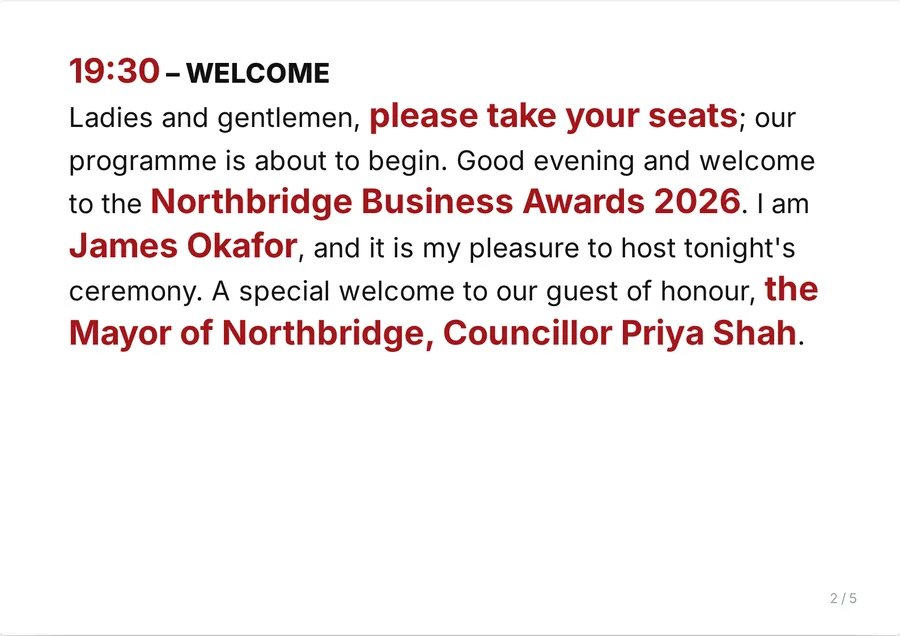
CueCardConverter turns a speech, host script or presentation into cue cards you can hold on stage. Paste your text or upload a Word, PDF or PowerPoint file – from a presentation it reads the speaker notes, one section per slide. AI divides the text into cards that end at natural pauses, never mid-sentence, and timed sections such as “06:30 – Welcome” always start on a new card. Your wording is never rewritten.
Names, titles, numbers, dates, times and stage cues are highlighted in a deep red chosen to stay readable under stage lighting. Choose 3 × 5 or 4 × 6 inch index cards, A6, A5 or half letter; print one card per page or several per A4 or US Letter sheet with cut lines; rehearse in practice mode; or export to PDF, PowerPoint (PPTX) or Word (DOCX).
Cue cards are also called speech cards, note cards, prompt cards or, in Australia, palm cards. Unlike flashcard makers, which are built for studying questions and answers, this cue card maker is built for the speech itself: a host or MC script, a wedding toast, a school presentation or a conference talk, kept in order and readable at arm’s length.
How to create cue cards
- Add your speechPaste the text, or drop a Word, PDF or PowerPoint file onto the upload area.
- Let AI prepare the cardsThe text is split at natural pauses and key details are highlighted automatically.
- Review and adjustEdit the text, add or remove highlights, split or merge cards and change the font, size, spacing and colours.
- Practise, print or downloadRehearse card by card with a timer, print 3×5, 4×6, A6 or A5 cards on A4 or Letter with cut lines, or download PDF, PPTX or DOCX.
Read the full guide: how to make cue cards for a speech or event →
Why use CueCardConverter?
- Readable on stage: sans-serif fonts, 1.5–1.8 line spacing and wide margins, so your fingers don’t cover the text.
- Fast last-minute changes: load a revised Word file and your design settings and manual highlights are kept.
- Every card size, ready to cut: 3×5 and 4×6 inch, A6, A5 or half letter, several per A4 or Letter sheet with cut lines and crop marks, plus an optional back side with your logo and event name.
- Practice mode: rehearse full screen, one card at a time, with a timer – use the arrow keys, a presentation clicker or swipe on a phone.
- Keeps working offline: once the cards are created, editing, printing and exporting continue without an internet connection.
- No manual Word formatting: every card gets the same consistent layout, whoever prepares them.
Tools for speakers, hosts and event teams
The cue card converter – with PowerPoint and PDF import, the speech timer and practice mode built in – is ready to use today. Tools marked “Coming soon” are in development and can’t be used yet.
Stage tools
- Cue card converterTurn a pasted speech or a Word file into printable cue cards.Use now →
- PowerPoint notes to cue cardsUpload a .pptx file and print your speaker notes as cue cards, one section per slide.Use now →
- PDF to cue cardsTurn a speech or script saved as PDF into readable, highlighted cards.Use now →
- Palm card makerShort 3×5 or A6 palm cards for oral presentations, four to an A4 sheet.Use now →
- Speech timerSee the estimated speaking time of every card and the whole speech, at your own pace.Use now →
- Practice modeRehearse full screen, card by card, with a timer and clicker or swipe control.Use now →
- Teleprompter modeScroll your speech on screen at your own pace.Coming soon
- Share by QR codeSend the cards to a speaker’s phone with a QR code.Coming soon
- Brand templatesSave your logo, colours and card layout for every event.Coming soon
Who is it for?
- Event hosts and moderators running a programme with timed segments
- Speakers and presenters at conferences, launches and ceremonies
- Event agencies and stage managers preparing cards for someone else
- Corporate communications and protocol teams
- Teachers and students giving talks or presentations
Guides for speakers, hosts and event teams
- How to make cue cards for a speech or eventA practical guide to cue cards: how much text to put on each card, which font size and spacing to use, how to mark names and timings, and how to print them.
- Free palm card maker for speeches and oral presentationsTurn a speech or oral presentation into palm cards. Paste text or upload Word, PDF or PowerPoint, choose 3x5 in or A6, then print four cards per A4 sheet with cut lines.
- Turn PowerPoint speaker notes into cue cardsUpload a PowerPoint (.pptx) file and get printable cue cards from your speaker notes – one section per slide, names and numbers highlighted. Free, no sign-up.
- Convert a PDF speech into cue cardsUpload a PDF of your speech or script and get cue cards split at natural pauses, with names, numbers and times highlighted. Print 3x5, 4x6, A6 or A5. Free.
- How many cue cards do you need for a speech?How many cue cards for a 3, 5 or 10-minute speech, by card size and by full script or keywords. Includes a quick formula and words-per-card guide.
- Cue card makers for speeches comparedA side-by-side comparison of free cue card makers for speeches – CueCardConverter, EasyPalmCards, ToastBuddy, The Speech Site and a Word template – by input, sizes, printing and price.
- How to write an MC script that keeps your event on timeHow to write an MC script for any event: structure, sample host lines, transitions and timings, plus how to turn the emcee script into print-ready cue cards.
- Run of show template: how to plan an event programme minute by minuteA practical run of show template for events: which columns to use, a sample event program flow with times, and how it links to the host script and cue cards.
- What is a cue card and when should you use one?What is a cue card? Learn what cue cards are used for, how they compare with a teleprompter and speaker notes, and who relies on them at live events.
- Free cue card template (Word, PDF): 3×5, 4×6 and A5 sizesDownload free cue card templates for Word and PDF in 3x5 and 4x6 inch index card and A5 sizes, plus font size, margins, paper weight and how to print several cards per sheet.
- Moderator cue cards: how to run a panel discussion from your cardsHow to prepare panel moderator cue cards: speaker introductions, one question per card, follow-ups, time management and a clean close, with a sample card.
- How to write an award ceremony script and winner reveal cardsWrite an award ceremony script that runs smoothly: category intros, nominee lists, winner reveal cards, sponsor mentions and pronunciation, with examples.
- Event planning checklist: what to do and when, from one month out to show dayA practical event planning checklist with a timeline from T-30 to show day: roles, speakers, guest logistics, run of show, scripts and printed cue cards.
- How to edit cue cards when the script changes at the last minuteA show-day routine for editing cue cards after last-minute script changes: version control, re-highlighting, splitting and merging cards, and reprinting fast.
- Opening speech examples and a simple structure for welcome remarksOpening speech examples for meetings, conferences, launches, galas and graduations, with a five-part structure, timing guide and cue card delivery tips.
- MC script examples: ready-to-use host lines from doors to closingMC script examples for every segment: house announcements, welcome, VIPs, speaker intros, breaks, awards and closing, plus a sample 1-hour conference script.
- Cue card examples: three real decks with PDFsSee real cue cards made with CueCardConverter: a launch speech, a timed host script and a panel moderator deck – source text, card images, timings and print-ready PDFs.
Frequently asked questions
What is a cue card?
A cue card is a small card that a speaker or host holds while speaking. It carries the script or the key points in large, easy-to-read text, so the speaker can keep eye contact with the audience and glance down only when needed.
How do I turn my speech into cue cards?
Paste the text on this page or upload a Word, PDF or PowerPoint file. CueCardConverter splits it into cards of about 80–120 words at natural pauses and highlights names, numbers, dates and stage cues. Review the cards, make any changes, then print or download them.
Is this a flashcard maker?
No. Flashcard makers are built for studying question-and-answer pairs. CueCardConverter turns a speech or script into cue cards (also called palm cards or speech note cards): it keeps the text in order, splits it at natural pauses, highlights names and numbers and formats each card to be read on stage.
Which file formats can I use?
You can paste text or upload Word (.docx), PDF, PowerPoint (.pptx), OpenDocument (.odt), TXT or Markdown files up to 40 MB. Scanned PDFs without selectable text and older .doc or .ppt files are not supported. Finished cards can be printed directly or downloaded as PDF, PPTX (PowerPoint) or DOCX (Word).
Which cue card sizes can I print?
A5, half letter (5.5 × 8.5 in), A6, and 4 × 6 or 3 × 5 inch index cards, in landscape or portrait. Print one card per page on card stock, or several per A4 or US Letter sheet with dashed cut lines and crop marks – for example four 3 × 5 cards or two A5 cards per sheet.
Can I turn PowerPoint speaker notes into cue cards?
Yes. Upload the .pptx file and the speaker notes are used, one section per slide, so each slide starts a new card headed with its number. If there are no notes, the slide text is used instead. Google Slides and Keynote presentations work once downloaded as .pptx.
Can I rehearse with my cue cards?
Yes. Practice mode shows one card at a time in full screen with a timer and the estimated time for each card and the whole speech. Move through the cards with the arrow keys, a presentation clicker or by swiping on a phone; the screen stays on while you practise.
Can I change the font, colours and the back of the cards?
Yes. You can choose Inter, Roboto or Montserrat, set the font size (10–30 pt), line spacing (1.5–1.8×), highlight colour and size, and turn bold highlights on or off. The back of each card can show your logo, the event name and a background colour.
Does it work without an internet connection?
An internet connection is needed for the AI analysis. After your cards are created you can keep editing, printing and exporting offline, and your work is saved in your browser. If the AI can’t be reached, the text is split on your device and you can add highlights yourself.
Is CueCardConverter free, and what happens to my text?
CueCardConverter is free to use and doesn’t require an account. To create the cards, your text is sent over an encrypted connection to our server and processed by an AI provider (Anthropic); we don’t store it on our servers. Your cards and settings stay in your own browser. See the privacy policy for details.
The stage is yours.
Your speech, split into readable cards and ready to print in seconds.
Create your cue cards